SYSTEM&WEB HACKING

Tuesday, November 8, 2011

Duqu Analysis and Detection Tool by NSS Labs


NSS Labs has built a new, free tool that detects known and newly created Duqu drivers that have infiltrated systems, thus allowing security experts to further analyze the “functionality, capabilities and ultimate purpose of DuQu.”. The Tool is available free.

Duqu is notorious worm that exploit Windows Zero-day Vulnerability. Microsoft released temporary fix yesterday for this vulnerability . According to the test, NSS tool Success rate is 100%, zero false positivies. Developers said it is using advanced pattern recognition techniques, it is also capable of detecting new drivers as they are discovered.Two new drivers were discovered after the tool was completed, and both were detected by the NSS tool with no updates required.

It seems that Duqu contains similar code and utilizes similar techniques to Stuxnet. More precisely, it seems to make use of digital certificates that appear as legitimate, but it's far too early to describe it as Stuxnet 2.
More Info :
  • DuQu contains similar code to that used by Stuxnet.
  • DuQu uses similar techniques to Stuxnet, specifically the use of drivers signed by “legitimate” digital certificates. It is not known whether those certs were stolen or manufactured by the attackers following the compromise of a certificate authority (CA.)
  • DuQu is not self-replicating (although some theorize that it can be commanded to replicate itself across network shares); it requires the use of an exploit-based “dropper” to install it on a system.
  • The installer, which utilized a zero day kernel exploit delivered via a Microsoft Word document, has now been recovered and is currently being analyzed.
  • DuQu installs a keylogger in order to record keystrokes and collect other system information.
  • Stolen information is packaged into encrypted and compressed image files for subsequent exfiltration.
  • DuQu was communicating over HTTP/HTTPS with its intial command and control (CC) server in India; a custom CC protocol was implemented using modified image files. As of this writing, the CC server has been deactivated.
  • DuQu was initially configured with a fixed life, set to deactivate after 36 days, although additional components can be installed to extend this as required.

Monday, October 10, 2011

ExeScan - PE File Anomaly Detector Tool

About ExeScan
ExeScan is the FREE console based tool to detect anomalies in PE (Portable Executable) files. It quickly scans givenexecutable file and detect all kind of anomalies in its PE header fields including checksum verifications, size of various header fields, improper size of raw data, non-ascii/empty section names etc.

Various packers/protectors modify PE header to make reversing harder. Sometimes anomalies in PE header may crash Debugging tools thereby blocking your attempt to reversing. Such anomalies can also make some of the GUI based PE analysis tools to fail to parse PE headers. 

In such cases ExeScan can come handy by helping you to quickly detect such anomalies. Then you can fix them and proceed to further analysis of malware. 

In addition to finding various anomalies, it can also detect packer/compiler used to pack/build the target executable file. Beingconsole based tool, you can easily integrate it with your malware automation suite. 


Features of ExeScan
Here are the main feature highlights
  • Quickly detect all kind of Anomalies in EXE/PE file.
  • Console tool makes it easy for automation.
  • Compiler and Packer signatures detection
  • Scan for commonly used malware APIs
  • PE header and Import table structure dispaly


Requirements
 ExeScan requires following components 
  • Python - Install latest version of Python.
  • PEFile - PE File Python Module by Ero Carrera 

Using ExeScan

ExeScan is very simple and easy to use.  

Here are the brief usage details
  •  Before you launch - make sure you have installed all the above mentioned requirements.
  •  Next launch command prompt (start=>Run=>cmd.exe) and move to directory where you have extracted ExeScan file
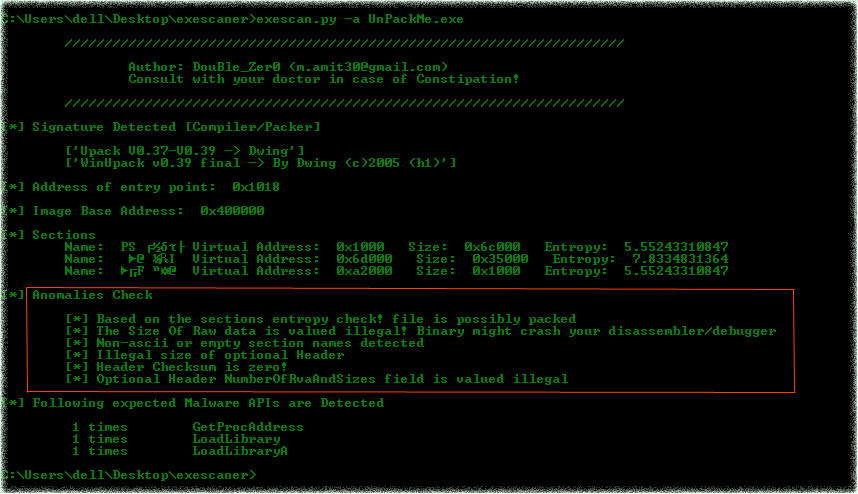
  •  Then type 'exescan.py -a <path to exe file>' and instantly it will show all the anomalies along with other PE information as shown in the screenshot below.


Screenshots of ExeScan

Here is the screenshot of ExeScan detecting various anomalies in packed PE file


ExeScan analyzing PE file


Sunday, October 9, 2011

Facebook content restrictions bypass Vulnerability

Blackhat Academy claims to have found a way to bypass content restrictions on links, as posted on theirsite and posts put on a user's public wall. Even Security Analysts claim that Facebook was notified of these vulnerabilities on July 31st, 2011.
 
Facebook has only recently purchased Websense to attempt to push this vulnerability under the rug, however the exploit still works.To access Facebook's FQL API, Facebook was even so kind as to give a reference of tables and columns in the documentation for FQL. FQL does not allow the use of JOINS, however it is not needed as everything is thoroughly documented. Attackers can misuse this during the creation of a malicious Facebook application or directly on the FQL development api page for information gathering. :

<?php
# User agent checking methods
$fb_string = '/facebookexternal/i';                # facebookexternal shows in the facebook content scanner's user agent
$gplus_string = '/Feedfetcher-Google/i';       # googleplus shows up in the user agent as well.
# rDNS Lookup Methods
$host_websense = '/websense.com/i';         # Checking the rdns for websense filters
$host_fb = '/tfbnw.net/i';                              # Checking the rdns for tfbnw.net - facebook host
# Load the request properties
$u_agent = $_SERVER['HTTP_USER_AGENT'];
$u_ref     = $_SERVER['HTTP_REFERER'];
$u_host  = gethostbyaddr($_SERVER['REMOTE_ADDR']);
# If we're coming from or facebook or websense or google plus, 
if (preg_match($host_fb,$u_host) || preg_match($host_websense,$u_host) || preg_match($fb_string,$u_agent) || preg_match($gplus_string,$u_agent)) {
    # Display an image
    header('Content-Type: image/jpeg');
    @readfile ('/var/www/localhost/cute_kitten.jpeg');
} else {
    # Rickroll this unsuspecting user
    header('Location: http://www.youtube.com/watch?v=dQw4w9WgXcQ&ob=av3e');
}
?>

While most major sites that allow link submission are vulnerable to this method, sites including Websense, Google+, and Facebook make the requests easily identifiable. These sites send an initial request to the link in order to store a mirror thumbnail of the image, or a snapshot of the website being linked. In doing so, many use a custom user agent, or have IP addresses that resolve to a consistent domain name. Facebook IP addresses resolve to tfbnw.net, also set a custom user agent of "facebookexternalhit".Google+ (also notified Jul. 31st and guilty of reasonable care) again follows suit and utilizes "Feedfetcher-Google" as their user agent. Knowing this, we can easily filter out requests coming from these websites, and offer up a legitimate image to be displayed on their site, while redirecting or displaying a completely different page to anyone that follows the links. Facebook's recent partnership with Websense is laughable, due to Websense's "ACE" security scanner that is just as easily identified, by using gethostbyaddr in order to resolve the IP back to websense.com. Utilizing this technique would allow an overwhelming number of malware sites to remain undetected to their automatic site analysis. Other places like digg.com either spoof a user agent to look like normal traffic, or forward the client's user agent, which makes it more difficult to catch every one of their requests. Fortunately, digg.com only requests the link once, prior to submitting the link to the world. This allows attackers to serve up a legitimate image until that initial request clears our server, and then replace it with a less than honest file. We have affectionately named this vulnerability class Cross-Site Content Forgery.Proof of Concept can be seenhere.